

Coverage testing
Playing your project walks one route. Coverage testing walks hundreds. It plays the project many times with seeded random runs and reports what actually came up, so you catch content a player can never reach before a player does.
It’s the same machinery in the editor and on the command line, so what you see in Storyletter is what a CI gate sees.
In Storyletter
Section titled “In Storyletter”Review ▸ Coverage Test… (Shift+Cmd+C) opens the Coverage window.
Three fields, Runs, Max turns, and Seed, and a Run coverage button. The same seed always reproduces the same run. Nothing runs until you press it: the window opens on the last report, saying when it ran and whether the project has changed since, or on a Run button when there is none.
While a sweep is running, a strip across the top shows how far along it is, how long it has taken and roughly how long is left, with a Cancel button. The editor stays usable throughout, so you can keep working and stop it whenever you like.
Cancelling doesn’t throw the work away. It finishes the run it’s in the middle of, then reports what it measured, marked stopped early beside the headline. The run count is what it actually got through. A partial answer to “does my content get dealt?” is usually still the answer.
The previous results stay on screen, dimmed, while a new sweep runs, so you can read the last answer without mistaking it for the live one.
Coverage is a tool window like the Board and Find. It stays open while you edit and sits over the editor by default, which the Pin button releases. The last report stays put, so closing and reopening the window shows you what you last measured. Opening a different project clears it.
Under the bar, one line says whether you’ve told it how your game’s own state moves: either “3 game values for coverage, feeding @world.” or “No game values for coverage. Content gated on @world will read as never dealt.” Beside it, Game values for coverage… takes you straight to where they’re edited.
Reading the results
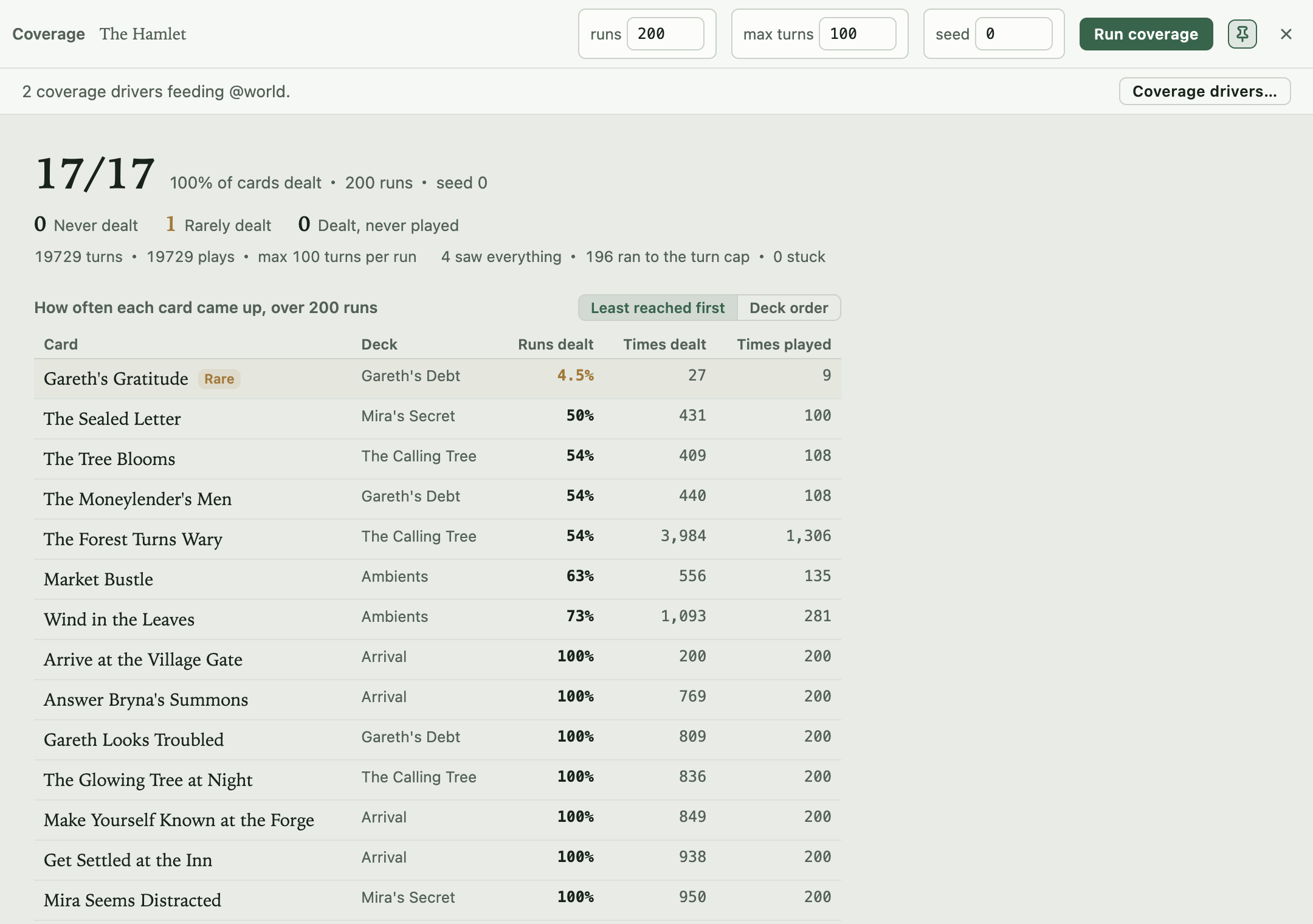
Section titled “Reading the results”The numbers at the top. The big count is cards dealt out of all your cards, with the share beside it, then the run count and the seed. Under it, three counts say how many cards want a look. Never dealt counts the cards no run dealt. Rarely dealt counts the cards that were dealt, but in fewer than 5% of runs. Dealt, never played counts the cards that reached a hand and never had an outcome played.
How the runs ended. Under the numbers, one line gives the turns and plays, and the next says how the playthroughs ended. A run that saw everything dealt every card and played every card that plays only once, so it stopped early. A run that ran to the turn cap went the full number of turns. That’s normal for a story with branches, because one run takes one path and the other runs see the rest. A stuck run went 20 turns with nothing dealt. Runs that mostly go stuck mean the content jams rather than that it was measured. Hover the line for a reminder.
The table. Each row is one card: its title, its deck (with its box beneath, when the project has more than one), and three numbers:
- Runs dealt is the share of runs that dealt the card at least once.
- Times dealt is how many times it was dealt across all the runs together. A card that stays in a hand counts again each turn it’s there, so this is usually far more than the number of runs.
- Times played is how many times an outcome of it was played across all the runs. It can also be more than the number of runs, when a card comes round again.
Runs dealt says how easily a card comes up. The two times say how much it was seen once it did. A card with no outcomes (a news headline, a codex entry, content whose whole job is to be dealt and read) shows no outcomes in the played column instead of a 0.
Least reached first, or deck order. The table opens least reached first. The cards no run dealt are at the top, then the rarest, down to the ones every run deals. That puts the rows worth a look where you see them first. Switch to Deck order for every card box by box and deck by deck, as you wrote them. The window remembers which you picked.
The test plays at random, so how often a card comes up isn’t how often a player will see it. Real players choose on purpose. Read the numbers as “can this happen, and how easily”, not as a forecast.
Every row is a way back into the work. Click a card, an outcome, or a hand and the editor opens it. Click a property named in one of the reasons below and Find opens on it, listing everywhere in the project that reads or writes it. That’s usually the quickest way to tell a mistake from a missing driver.
What it flags
Section titled “What it flags”Never dealt. A card no run dealt is tinted in the table, and says why where the reason is knowable:
- “gated on
@world.time_of_day, which nothing writes or drives” means the card depends on your game’s state and nothing in the content sets it. - “
@story.bridge_repairedis only written by Mend the Bridge, which never came up either” means the state is set, but only by another card that was never dealt. Two silent cards turn out to have one cause, and you know which to look at first.
A never-dealt card with neither line simply wasn’t reached in these runs.
Dealt, never played is a separate fault. These cards reach a hand, and no outcome of theirs is ever taken. Usually an outcome’s condition is the culprit. A card that’s dealt a thousand times and never played is invisible if you only count deals, so these rows have a tint of their own and say so under the title. A card with no outcomes is never counted here, and doesn’t block a run from counting as exhausted. Your game may play one, with no outcome, but a coverage run never does, so “never played” would be an accusation it can’t answer.
Rarely dealt
Section titled “Rarely dealt”A card tagged Rare was dealt, but in fewer than 5% of runs. It can happen, just not easily. Usually it sits behind an unlikely run of plays, or a condition that’s nearly always false. That can be exactly what you meant, like one encounter among many, or a secret. It’s worth a look when it isn’t, like a card most players should see that hides behind a condition you thought was common.
Outcomes, warnings, and hands
Section titled “Outcomes, warnings, and hands”Outcomes never played finishes the sweep at the branch level. A card can be well covered while one of its outcomes is unreachable.
Warnings collects two things the counts alone would hide. Any diagnostic the runtime
actually raised during the runs (a faulting condition, an undeclared name), deduplicated and
counted by run. And a check that needs no runs at all: a card or deck gate reading
@hand.something where some hand able to deal it has no such property. The gate faults
whenever that hand asks, so the content silently never deals from it, and a plain gap count
would have called it an ordinary miss.
Cards seen in each hand, over 200 runs sits at the bottom, folded away. Open it to see coverage hand by hand, which matters because a hand is the contract between your designer and your programmer. One row per hand, named as the navigator names it, with its game ID and its number of deals quietly beneath. The count is out of the cards that could ever come up in that hand, not out of every card in its box: the cards its Cards tab lists. A card that names another hand, or is filed to a different zone or tag from the one this hand is bound to, doesn’t count against it. A card’s conditions aren’t considered, and a tag group chosen as the game runs counts as matching anything, so nothing a run could deal there is left out. A full hand highlights, and a short bar means cards that could come up in that hand never did in any run. A hand that no card’s tags can reach says so instead of showing a bar. In a project with more than one box, the hands are grouped under their box’s name.
On the canvases
Section titled “On the canvases”With View ▸ Coverage Overlay on, the node canvas and the project map wear the last run. A card face carries a band reading never dealt or never played, a hand’s pin on the map is ringed by how much play reached it (dashed when nothing was ever dealt there), and hovering a card shows how often it was dealt and played. A card that’s fine shows nothing, so the overlay only ever points at a problem.
Content gated on your game’s state
Section titled “Content gated on your game’s state”@world belongs to your game, and so does any other host scope it provides (@player, say).
Coverage can’t invent your game’s behaviour, so content gated on them can’t be reached unless
you tell coverage how that state moves. Rather than
reporting such a card as dead, coverage says why it couldn’t get there.
The fix is a game value for coverage (a driver in the project file), and when there’s a gap of that kind the window offers one button: Add game values for coverage. It works out a starting set from your conditions, writes them into the project, and re-runs. Content that was unreachable becomes reachable, and anything still never dealt after that is a real gap.
Writing drivers by hand
Section titled “Writing drivers by hand”The quick fix gets you a starting point, and Project Settings ▸ Game scopes is where you tune it. The host-scope declarations and the drivers that feed them sit on one page, because they’re two halves of one statement: the game owns this value, and here’s how it moves.
Each driver is a property, a pool of values, and when it fires:
| Field | What it means |
|---|---|
| Property | The host-scope property to drive: @world’s, or @player’s, or any other scope your game provides (once there’s more than @world, the row offers a choice of scope). Only host scopes are drivable: @story is written by your outcomes, so play already covers it. |
| Values | The pool, comma separated. true, false drives a flag; 0, 50, 51 drives a number; anything else is text. A run picks from the pool at random. |
| When | at the start fixes the value for a whole playthrough (a difficulty setting, a chosen class). each turn re-rolls it as the run goes (weather, time of day). |
| How often | For each turn drivers: rarely, sometimes, or often. |
Propose from the cards reads your conditions and fills the list in. For @world.danger >= 2
it proposes the boundary and its neighbours, 1, 2, 3, so the comparison is exercised from
both sides. It replaces the list, so propose first and tune after. Nothing is written until
you save the dialog.
A driver with no property name, or with an empty pool, can’t drive anything and is dropped on save.
Drivers live in the project file’s coverage block, so the editor, the CLI and CI all read
one versioned spec. They never reach the compiled bundle.
From the command line
Section titled “From the command line”storyletengine coverage is the same run with the same defaults, which is what makes it a CI
gate:
$ storyletengine coverage the-hamlet.storyletscoverage: 200 run(s), seed 0, max 100 turns/run, 19729 turns, 19729 playsinputs driven: @world.knows_road, @world.time_of_dayruns ended: 4 saw everything, 196 ran to the turn cap, 0 stuckcards dealt 17/17, played 17/17; outcomes played 25/25never dealt 0, rarely dealt 1 (under 5% of runs), dealt but never played 0hand the-forge: saw 9/9 cards that can come up here, over 30260 deal(s) in all runshand the-inn: saw 8/8 cards that can come up here, over 13874 deal(s) in all runshand the-mystic-tree: saw 5/5 cards that can come up here, over 19529 deal(s) in all runs
runs dealt = share of runs that dealt the card at least once; dealt, played = times across all runs; n/a = no outcomes‼ never dealt   ? never dealt, gated on state nothing sets   ~ rarely dealt (under 5% of runs)   ! dealt, never played
least reached first    runs dealt   dealt  played  card  ~       4.5%      27       9  [Gareth's Debt] gareths-gratitude           50%     431     100  [Mira's Secret] the-sealed-letter           54%     409     108  [The Calling Tree] the-tree-blooms
The table is the window’s, least reached first, with each card’s deck in brackets. --order deck
lists it deck by deck instead, under a heading per deck that counts its gaps. Each hand’s count
is out of the cards that could come up there, as in the window.
Never-dealt cards carry the same reasons the window shows, on the lines under them. Here is
the Saltmarsh example, run with --runs 20 --seed 1, which has two:
least reached first runs dealt dealt played card ? 0% 0 0 [Docks] ambush-at-the-ford gated on @hand.danger, written only by ambush-at-the-ford, which never came up either ? 0% 0 0 [Market] pickpocket gated on @story.reputation, written only by ambush-at-the-ford, pickpocket, which never came up either 100% 51 20 [Market] mysterious-stranger 100% 2000 1980 [Docks] rat-job--fail-on-gap exits 1 on any never-dealt card, on any unprovided @hand read, and on any
runtime warning the runs raised. --json gives you the full report.
--propose prints the driver block instead of running, which is the same derivation the
editor’s quick fix uses. Every flag is on the CLI page.
Gating a build on it
Section titled “Gating a build on it”storyletengine coverage --runs 200 --fail-on-gapThat’s all CI needs. A never-dealt card fails the job, and because the run is seeded, a failure reproduces exactly on the machine you debug it on.
Open source under the MIT licence, made by Ian Thomas.